Menno te Koppele's blog called my attention to this: "Microsoft Dynamics CRM 4.0 is officially supported to run on a computer that is running Microsoft Virtual Server 2005 in production systems.". You can read Menno's post here and Microsoft's related KB here.
This is great because I'm actually deploying my MS CRM Dynamics 4.0 development environment on a Virtual Server 2005 and I want to follow this approach for my production environment.
However be aware of the following "Microsoft does not test or support Microsoft software on a computer that is running non-Microsoft hardware virtualization software. ".
Showing posts with label deployment. Show all posts
Showing posts with label deployment. Show all posts

2008-04-18
MS Dynamics CRM 4.0 Implementation Guide Refreshed
Miscrosoft released a new version (4.1.0) of the Implementation Guide (IG). You should get it here. The IG consists of the Planning Guide, Planning Tools, Installation Guide and Operating and Maintaining Guide. I'm printing it as we speak.
2008-04-03
Unwanted headache due to data type mismatch
First of all let me explain how my MS CRM Dynamics 4.0 system gets it's data.
Like any other company we have one big ERP/PMS that is our main data source and other small ERP/PMS systems. Most of this systems rely on MS SQL Server technology (2000 and 2005) for their database needs. This is great because it allows us to use SQL Server 2005 Integration Services (SSIS) to pump the data from each system's database and consolidate it to a single database. In the BI (Business Intelligence) world this process is called ETL or Extraction, Transformation and Loading. Although here we rely on the SSIS for the Extraction and Transformation phases and then we use CrmService webservice to send data to the CRM (create, update). Doing this we make sure our CRM and our ERP/PMS systems are automatically synched. Although this sounds very simple and you can learn it by yourself it really speeds up the process if you can get help from someone more experienced.
We are now developing the console application that will run in the background. This app will be responsible for retrieving data from the ETL databse and push it to the CRM using the CrmService webservice. For instance, we retrieve one contact (transformed) from our ETL database and then we push it to the CRM but first we need to know if the contact already exists there. Why's that? If the contact exists we use the Update method, if it doesn't we use the Create method. How to determine if he exists? Simple, choose a key field such as ERP/PMS customer number. This ERP/PMS primary key (PK) will act as a foreign key (FK) for our contact. If the contact is found we return the GUID and then call the Update method.
For more details about CrmService and it's methods I would advise you to take a look at Working with Microsoft Dynamics CRM 4.0 and Microsoft Dynamics CRM 4.0 Unleashed. This books are good starting points for learning how to use the CrmService. They are better used together as one has more details but fewer examples and the other has more examples and fewer details.
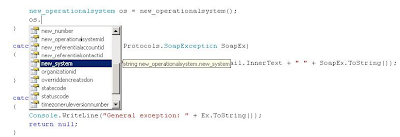
After some initial coding and successfull testing (retrieve data, push data) using the new much appreciated Visual Studio 2008 our problems began. Our last build of the console application crashed again and again and we didn't know why. Through debbuging we realized that it was a problem related with our RetrieveMultiple method call. After a couple of ours of nonsense coding we caught the bug: earlier we had changed an entity attribute from picklist to string (delete attribute, new attribute, save and publish), however our webreference (Visual Studio 2008) didn't reflect that change and we had to remove the web reference and add it again in order to "squish" the bug! This picture saved the day!
2008-03-31
POP3 and MS CRM 4.0 Queues
Michael Lu made this excellent video about using MS CRM Dynamics 4.0 E-mail Router with POP3 account. He used a Gmail account as an example. I recommend you to watch the video.
I myself conducted a similar test and I will write about it soon. I used a regular Gmail account as the user's mailbox.
I myself conducted a similar test and I will write about it soon. I used a regular Gmail account as the user's mailbox.
2008-03-24
Microsoft Dynamics CRM 4.0 Connector for SQL Server Reporting Services Issue

This long name component "Microsoft Dynamics CRM 4.0 Connector for SQL Server Reporting Services Issue" gave me a long time trouble to install. I got this error message "Unable to validate SQL Server Reporting Services Report Server installation". As I had followed all the steps and recomendations mentioned on the installation guide I didn't know what was causing that unexpected behavior.
I googled a little and I found this KB article (KB947060) about it. The problem occured because I was trying to install the MS Dynamics CRM Connector for SQL Server 2005 Reporting Services on a named instance of SQL Server 2005 RS and it seems the installer doesn't behave as it should under these conditions.
The KB gave me two possible resolutions but only one applied to my situation: Method 2: Modify the Install-config.xml file. The steps needed to solve this issue are well explained in the KB article. If you're running SQL Server 2005 on a AMD 64 platform don't forget to copy the SrsDataConnector files from the drive:\Server\am64 folder instead of the suggested drive:\Server\i386. I sent a feedback to Microsoft about this tiny detail.
After modifying the install-config.xml file for the SrsDataConnector I finally ran the SetupSrsDataConnector.exe /CONFIG path of the folder that contains the Install-config.xml file\install-config.xml command and managed to finish the installation successfully.
I googled a little and I found this KB article (KB947060) about it. The problem occured because I was trying to install the MS Dynamics CRM Connector for SQL Server 2005 Reporting Services on a named instance of SQL Server 2005 RS and it seems the installer doesn't behave as it should under these conditions.
The KB gave me two possible resolutions but only one applied to my situation: Method 2: Modify the Install-config.xml file. The steps needed to solve this issue are well explained in the KB article. If you're running SQL Server 2005 on a AMD 64 platform don't forget to copy the SrsDataConnector files from the drive:\Server\am64 folder instead of the suggested drive:\Server\i386. I sent a feedback to Microsoft about this tiny detail.
After modifying the install-config.xml file for the SrsDataConnector I finally ran the SetupSrsDataConnector.exe /CONFIG path of the folder that contains the Install-config.xml file\install-config.xml command and managed to finish the installation successfully.
2008-03-21
MS CRM 4.0 Implementation Guide (IG)
You can download the Implementation Guide (IG) here. I read the Planning Guide, the Installing Guide and the Operating and Maintaining Guide in less than 3 hours while I was going from Lisbon to Porto (Oporto) by train. These three guides together with some useful file templates make up the helpful Implementation Guide. The IG is very well written and clear.
I confess that I started to deploy MS CRM 4.0 whithout reading the IG as I should. I gave it just a quick look speacilly to the new features and then I started the MS CRM 4 installation. One of the questions I had and I made a post here and at the dynamics forums about it was which base language to choose. Well after my last reading of the guide I got it figured it out whithout no doubts. I read at page 3-31 of the Planning Guide the following: "The base language of Windows Server, SQL Server... must be the same language version as Microsoft Dynamics CRM Server. - or- The base language of Windows Server, SQL Server... must be U.S. English". So it's quite clear to me: the safest scneario is allways to deploy MS CRM in english and then add it the language packs available if you have to. End of discussion.
Another important thing I learned from the IG was that the Data Migration Manager or DMM for friends is quite demanding in terms of requirements. At page 5-40 of the Installing Guide one can read that:
I confess that I started to deploy MS CRM 4.0 whithout reading the IG as I should. I gave it just a quick look speacilly to the new features and then I started the MS CRM 4 installation. One of the questions I had and I made a post here and at the dynamics forums about it was which base language to choose. Well after my last reading of the guide I got it figured it out whithout no doubts. I read at page 3-31 of the Planning Guide the following: "The base language of Windows Server, SQL Server... must be the same language version as Microsoft Dynamics CRM Server. - or- The base language of Windows Server, SQL Server... must be U.S. English". So it's quite clear to me: the safest scneario is allways to deploy MS CRM in english and then add it the language packs available if you have to. End of discussion.
Another important thing I learned from the IG was that the Data Migration Manager or DMM for friends is quite demanding in terms of requirements. At page 5-40 of the Installing Guide one can read that:
- "Important: You cannot run the DMM on the same computer when MS Dynamics CRM for MS Outlook is running. You must close MS CRM for MS Outlook before you run the DMM." Understood!
- "The DMM can only be run by a user with the System Administrator secutiry role.". They are referring to the MS CRM secutiry role! That could be better explained! I will pinpoint that to Microsoft!
I also realized from what I read that the DMM has to be installed on the client machine rather than the server where MS CRM 4 is running. Don't forget the user has to have Local Administrator privileges to install it on her/his machine. I don't know about you but most of my CRM users are women!
I knew I had read it somewhere: at page 3-30 of the Planning Guide another important requirement or recommendation regarding the DMM:
- "Although DMM and MS Dynamics CRM for Outlook can be installed on the same computer they cannot be run at the same time." Thank you!
- "DMM must be installed on a computer that has a connection to the MS DYnamics CRM Server." Well... That's obvious!
- "We do not recommend that you install the DMM on a computer that is running MS Dynamics CRM Server." That's new for me! As I was havint troubles making DMM work I tried to install it on the server side... I won't do it again, promise!
Finally I also learned that I will need to install and run the MS CRM E-mail Router if I want to send and receive e-mails for Queues as I am planning to not deploy it (router) for my users. I will trust the great MS CRM Client for Outlook to do that because I had really bad experiences with the MS CRM 3 e-mail router.
2008-03-20
Translations for new fields (attributes) and entities


It's quite simple to transalte CRM fields (attributes) and entities labels. How do you do it? Go to Settings > Customization > Export Labels for Translation.
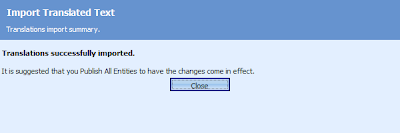
After translation (I used MS Excel to edit the file) you need to import the XML file back to CRM. Import Labels for translation. Then go to Customize entities and hit More Actions > Publish All Customizations and you should be done. It isn't enough to hit the Publish button you really have to Publish All Customizations. Don't ask me why... Ask Microsoft!
Datetime format issue
One of the first things I changed in the System Settings was the Current Format to Portuguese (Portugal).

However I still had to Set Personal Options Current Format to Portuguese (Portugal). You can do this at your CRM window menu under Tools > Set Personal Options. That may seem odd because if I have the server format configured to Portuguese (Portugal) my Personal Options should reflect that. A bug or a feature? I'm guessing this is a feature because it allows one to work with the format one preferes.

However I still had to Set Personal Options Current Format to Portuguese (Portugal). You can do this at your CRM window menu under Tools > Set Personal Options. That may seem odd because if I have the server format configured to Portuguese (Portugal) my Personal Options should reflect that. A bug or a feature? I'm guessing this is a feature because it allows one to work with the format one preferes.

Missing fields!
MS CRM has a great collection of contact fields (attributes) but lacks some basic fields suchas as ID document related (ID type, ID number and ID Country Issuer) and VAT document related (VAT number and VAT Country Issuer). Another request for Microsoft!
 Custom attributes that should be system (standard) attributes.
 Custom attributes that should be system (standard) attributes.
 ID related fields go to section Personal Information at Details tab.
 And VAT fields go to the Billing Information section at Administration tab.
MS CRM 4 System Settings
Some quick tips about setting up MS CRM System settings.
 Don't forget to change Current Format for you current format which in my case is Portuguese (Portugal).
 Don't forget to change Current Format for you current format which in my case is Portuguese (Portugal).
 If you wish to switch off the tracking token you should go to the e-mail tab and uncheck Use Tracking Token. You couldn't do this with MS CRM 3.0. This is a great new feature! Don't worry because you will be able to track your CRM related e-mails using the MS CRM Dynamics Client for Outlook.
 I also set the auto-unsubscribe option. This feature was also available at MS CRM 3 release but now you can also set a template e-mail to automatically confirm the unsubscription. Just keeps getting better! The Send Marketing Materials is one of me the most important fields for CRM contacts and accounts because when you launch a campaign you should allways check if your customers wish to receive Marketing Materials or not. You can do that when creating the Marketing List and choosing the right conditions of the filter: Send Marketing Materials = Yes.
 Here you can check or uncheck the Application mode. This is also a new and welcomed feature that will let choose if you want your CRM browser window to show the address bar or not. If you have a lot of activities and customers I would advise to open MS Dynamics under the Application mode.
Subscribe to:
Posts (Atom)