Showing posts with label features. Show all posts

2008-11-11

Microsoft Dynamics CRM 5.0 news

Big news! There is a new post about "What's new in CRM5" at Microsoft Dynamics CRM UK's Team Blog . You should read it!

I specially welcome these two new features:

  • "Team Ownership - Entities in CRM 4.0 were either User Owned or Organisation Owned. Now Team Owned entities are added in CRM5, and integrated into the role-based security model.
  • Unstructured Relationships - The next generation of "set regarding" and "relationship roles" functionality, allowing you to define ad-hoc relationships between any two entities."

Team Ownership is a feature that mimics the reality of sales/service teams. Teams should be able to own objects because that's how it works in real life. With CRM3 and CRM4 I would have to create an extra "fake" Business Unit to mimic this scenario.

Unstructered relationships are also welcomed because for me "set regarding" and "relationship roles" should be an unique flexible multiple-input field! Enabling multiple "regarding to" references would really make a big difference towards a better CRM usability experience! Go CRM5!

2008-06-05

MS Dynamics CRM 4.0 and Marketing Newsletters soon to come

I would like to let you know that I'm writing some lines (and hope to post them here soon) about MS Dynamics CRM 4.0 and Marketing Newsletters.

As we are testing and developing our CRM 4.0 we are spending nearly 80% of our time trying to understand and overcome some limitations regarding this marketing process. We even developed a specific workflow to send newsletters from Queues and another one just to handle errors (Mail Delivery Failed, Undeliverable...). These workarounds are not perfect but they are very useful for us. I will also tell you how the unsubscribe works (dynamic, hardcoded...).

But you'll have to wait a couple of days because I'll be on holidays during next week.

2008-04-15

How to send HTML marketing e-mails

If you don't know exactly how to send HTML marketing e-mails I must warn you that it's really easy if you have basic HTML knowledge. Forget about MS CRM for a minute, write your own HTML code as you would if you were developing a webpage.
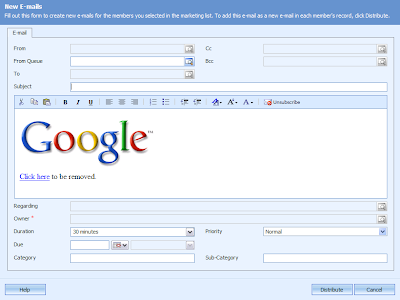
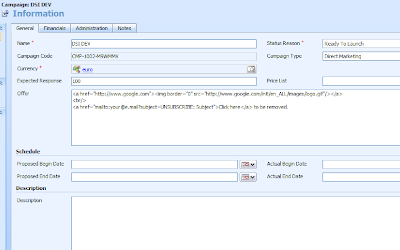
Then just copy and paste your HTML code into the field OFFER (Campaign) and then create a new campaign activity, select E-mail as your CHANNEL and then hit Distribute Campaign Activity. You should get something similar to this.

If you feel comfortable with HTML you can write your HTML code directly into the OFFER field as I did. If you want to include images don't forget to make them available through a public web folder. In this example I used the Google logo.

As you may also have noticed I hard coded the UNSUBSCRIBE e-mail address link. There is an explanation for that. Normally one would simply write a regular unsubscribe text and then select that text and hit the UNSUBSCRIBE button available when seting up the new e-mail activity. However if you set the FROM field to a Queue (as I did) your unsubscribe e-mail link will be broken to "mailto:[Run_Time_Address]?subject=[Run_Time_Subject]". After a lot of testing I gave up of this feature and decided to hard code the unsubscribe text/link. Doing this I'm also sure to include the unsubscribe text/link. I should warn you that the unsubscribe e-mail To should be the Queue's e-mail and the subject should be "UNSUBSCRIBE: E-mail Activity Subject". It's very important to match the UNSUBSCRIBE subject with the e-mail activity subject or the CRM won't be able to connect the unsubscribe request with the campaign in order to automatically create a campaign response and set sender's Send Marketing Materials = NO.

I will write a specific post about How to send e-mail campaigns from queues because I have some useful tips and tricks for you.

2008-04-14

How to Send E-mails from Queues


It's really very simple, just hit the lookup button after creating a new e-mail and change LOOK FOR "User" to "Queue". Then hit send and off you go. Don't forget you need the right CRM permissions for this (queues and send e-mail on behalf of).


2008-03-31

Missing System Fields 2

Another missing sytem field that I don't understand why isn't there: Preferred Language. Any CRM should include that, specially if it wants to grow in Europe! Microsoft listen this: add a Preferred Language field to Contacts and Accounts. A picklist would be nice! Thank you!

2008-03-28

More Report Wizard Videos

This time the publisher of the videos is a company called IMG.

Part 1


Part 2

2008-03-27

Microsoft Dynamics CRM 4.0 : Report Wizard with John O'Donnell

Watch and listen John O'Donnell about the new Report Wizard here. Very interesting! This feature allows CRM users to develop some basic reports by their own! Power to the users! Free the developers!

2008-03-26

Using the Auto Mapping Feature

As I was about to write a post about Using the Auto Mapping Feature I realized that a similar post was available at the Microsoft Dynamics CRM Team Blog. Their post is very complete so I thought I should add just an important warning.


When you create the CSV file you'll use to import the data to MS Dynamics CRM 4.0 remember that the field names are case sensitive: "E-mail" (correct) is different from "E-Mail" (wrong). I lost a couple of minutes to fix my data files in order to use the Auto Mapping Feature because of incorrect field names. If your pick list values (file) are equal to CRM's picklist values you can also use the Auto Mapping feature.


If you can't get it right or if your data type needs some kind of transformation (for instance pick list value "Done" becomes "Completed") and you prefer not to mess with your data file then you'll have to create your own Data Map. I will write about this tomorrow because although it's simple I had to use a workaround to accomplish it.

2008-03-25

Microsoft Dynamics CRM 4.0 Outlook Client Demonstration

Another interesting video, this time about the MS Dynamics CRM 4.0 Outlook Client. This new client represents an huge step forward regarding MS CRM usability. The MS CRM 3.0 client for Outlook gave me too much headaches. I hope the new 4.0 client behaves better. During my early tests it did but I will only make a final statement after I release it to my users desktop.

Microsoft Dynamics CRM 4.0 Sales Demonstration

If you are not familiar with MS Dynamics CRM 4.0 Sales features for starters you should watch this video.

2008-03-21

The best new CRM feature: Buit-In Customizable Duplicate Detection

For me this feature is one of the best new features. Only the new MS CRM Client for Outlook compares to it. There are much more new and great features but these two were the ones that gave me headaches while deploying MS CRM 3.0.

The best way to explain you what this Built-In Customizable Duplicate Detection feature is all about it to invite you to watch this video from the ConsultCRM guys.


2008-03-20

Missing fields!

MS CRM has a great collection of contact fields (attributes) but lacks some basic fields suchas as ID document related (ID type, ID number and ID Country Issuer) and VAT document related (VAT number and VAT Country Issuer). Another request for Microsoft!

Custom attributes that should be system (standard) attributes.


ID related fields go to section Personal Information at Details tab.


And VAT fields go to the Billing Information section at Administration tab.