As we are facing some DELETIONSTATECODE issues regarding Contacts and Leads we have been googling for a solution. Marco found this useful CRM 4 ScaleGroup Job Editor utility.
"This utility is used to change the DeletionService and Re-Indexing service jobs in CRM 4.0. You can set the next run date/time of a job as well as change the schedule at which the job will continue to run automatically. " as you can red here.
This utility works but it didn't solve our issues... And the search for a solution continues as we also try to better frame the issue.
Showing posts with label contacts. Show all posts
Showing posts with label contacts. Show all posts
2008-04-23

2008-04-04
Fix Date and Birthdate/Birthday (for MS CRM 4.0 CrmService)
If you are using CrmService's Create or Update methods perhaps you already noticed that when you send a date in the DD-MM-YYYY HH:MM:SS format CrmService will read this date as MM-DD-YYYY HH:MM:SS and that's what he'll write to your MSCRM db.
So if you're writing a contact's birthdate/birthday like "24-07-1980 00:00:00" CRM will throw an exception because he's using "24" as MM and "07" as DD when he shouldn't. You need a workaround such as your own fixDate() method. The following fixDate() method was created by Marco Silva, member of my MS CRM Dynamics 4.0 project team of two (me and him). This method gets something like "24-07-1980 00:00:00" and returns it in a CRM friendly format "07-24-1980 21:00:00". If you check your MS CRM db you will see the correct date but perhaps not the correct time "24-07-1980 20:00:00".
private static string fixDate(String date)
{
string day = data.Substring(0, 2);
string month = data.Substring(3, 2);
string year = data.Substring(6, 4);
string hour = "21";
string min = "00";
string sec = "00";
return month + "-" + day + "-" + year + " " + hour + ":" + min + ":" + sec;
}
You may notice that we're forcing the hour, minutes and seconds and there's a pretty good explanation for that. The explanation is related with Time Zone handling issues that affect MS CRM 4 (and 3). My time zone settings (MS CRM server, SQL server, desktop) are all GMT (...Lisbon). Some specific datetimes (not all) are written to MS CRM DB with less an hour and that makes them go back one day.
If you send "24-07-1980 00:00:00" or "07-24-1980 00:00:00" to be more accurate to your CrmService it will write "23-07-1990 23:00:00" to MS CRM db! Ooops! Wrong birthdate! However if you check your contact's file you will see "24-07-1980". However the MS CRM db birthdate datetime is wrong ("23-07-1990 23:00:00") and you can't export it to an external db such as a datawarehouse. The workaround for this one requires two different approaches: a CrmService approach and an onSave approach (to fix typed birthdates).
Both of these workarounds require you to change birthdate's time to something bigger than "01:00:00" because if the CrmService "steals" you one hour it won't "steal" you a whole day! I chose to set "21:00:00" as my "fake" time. So, if I send this CrmService friendly "fake" date "07-24-1980 21:00:00" to CrmService he will write "24-07-1980 20:00:00" to MS CRM db! And that works for me as the birthdate time isn't important (or visible). So my first workaround also is solved by the fixDate() method above. The second workaround has to be properly included inside the onSave event which you have to enable.
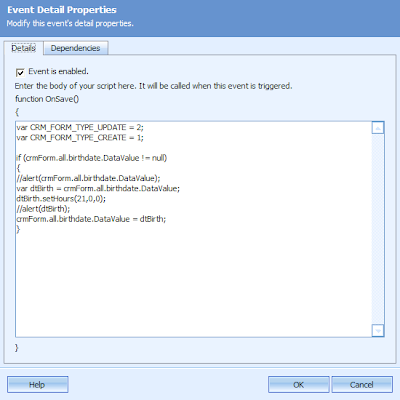 This workaround was provided by Pedro Pereira who helped me fix this issue for MS CRM 3.0 but it works fine with MS CRM 4.0.
So if you're writing a contact's birthdate/birthday like "24-07-1980 00:00:00" CRM will throw an exception because he's using "24" as MM and "07" as DD when he shouldn't. You need a workaround such as your own fixDate() method. The following fixDate() method was created by Marco Silva, member of my MS CRM Dynamics 4.0 project team of two (me and him). This method gets something like "24-07-1980 00:00:00" and returns it in a CRM friendly format "07-24-1980 21:00:00". If you check your MS CRM db you will see the correct date but perhaps not the correct time "24-07-1980 20:00:00".
private static string fixDate(String date)
{
string day = data.Substring(0, 2);
string month = data.Substring(3, 2);
string year = data.Substring(6, 4);
string hour = "21";
string min = "00";
string sec = "00";
return month + "-" + day + "-" + year + " " + hour + ":" + min + ":" + sec;
}
You may notice that we're forcing the hour, minutes and seconds and there's a pretty good explanation for that. The explanation is related with Time Zone handling issues that affect MS CRM 4 (and 3). My time zone settings (MS CRM server, SQL server, desktop) are all GMT (...Lisbon). Some specific datetimes (not all) are written to MS CRM DB with less an hour and that makes them go back one day.
If you send "24-07-1980 00:00:00" or "07-24-1980 00:00:00" to be more accurate to your CrmService it will write "23-07-1990 23:00:00" to MS CRM db! Ooops! Wrong birthdate! However if you check your contact's file you will see "24-07-1980". However the MS CRM db birthdate datetime is wrong ("23-07-1990 23:00:00") and you can't export it to an external db such as a datawarehouse. The workaround for this one requires two different approaches: a CrmService approach and an onSave approach (to fix typed birthdates).
Both of these workarounds require you to change birthdate's time to something bigger than "01:00:00" because if the CrmService "steals" you one hour it won't "steal" you a whole day! I chose to set "21:00:00" as my "fake" time. So, if I send this CrmService friendly "fake" date "07-24-1980 21:00:00" to CrmService he will write "24-07-1980 20:00:00" to MS CRM db! And that works for me as the birthdate time isn't important (or visible). So my first workaround also is solved by the fixDate() method above. The second workaround has to be properly included inside the onSave event which you have to enable.
This workaround was provided by Pedro Pereira who helped me fix this issue for MS CRM 3.0 but it works fine with MS CRM 4.0.
2008-03-31
Missing System Fields 2
Another missing sytem field that I don't understand why isn't there: Preferred Language. Any CRM should include that, specially if it wants to grow in Europe! Microsoft listen this: add a Preferred Language field to Contacts and Accounts. A picklist would be nice! Thank you!
2008-03-20
Missing fields!
MS CRM has a great collection of contact fields (attributes) but lacks some basic fields suchas as ID document related (ID type, ID number and ID Country Issuer) and VAT document related (VAT number and VAT Country Issuer). Another request for Microsoft!
 Custom attributes that should be system (standard) attributes.
 Custom attributes that should be system (standard) attributes.
 ID related fields go to section Personal Information at Details tab.
 And VAT fields go to the Billing Information section at Administration tab.
And let the fun begin: customization!

My first customization was really simple and logical. Being MS CRM 4 a strategic marketing tool I don't get why there isn't a tab called Marketing at the Contact form. Create, Save and Publish! Don't forget to Publish!

I'll just add the Marketing Information fields from the Administration tab here and create my customers preferences using a new bit attribute. It'll be easier for marketeers to create marketing lists if you use bit based preferences rather than creating a new entity called preferences. Now it's even easier to create attributes one after another thanks to the Save and New button for attributes. Another warning: by default the order of the bit values is No and Yes and if you check system attributes the order is Yes and No.

The last finding will only affect the order of the values. Check out Preferences attributes (custom) versus Send Marketig Materials (system attribute). To improve the user experience you should present the new attributes respecting the system order (Yes/No). The worst part of this is that you can't change the order (Move up or Move down) once the attribute is created. You need to unpublish it (remove it from the form then publish) and then you can delete it and create it again (create, add to form, publish). Boring! So be carefull!
Microsoft if you're listening please change de default bit attribute order! Well, if I don't shout I will never get it so I guess it's better to shout than not to.
Subscribe to:
Posts (Atom)