I would like to let you know that I'm writing some lines (and hope to post them here soon) about MS Dynamics CRM 4.0 and Marketing Newsletters.
As we are testing and developing our CRM 4.0 we are spending nearly 80% of our time trying to understand and overcome some limitations regarding this marketing process. We even developed a specific workflow to send newsletters from Queues and another one just to handle errors (Mail Delivery Failed, Undeliverable...). These workarounds are not perfect but they are very useful for us. I will also tell you how the unsubscribe works (dynamic, hardcoded...).
But you'll have to wait a couple of days because I'll be on holidays during next week.
Showing posts with label e-mail. Show all posts
Showing posts with label e-mail. Show all posts

2008-04-14
How to Send E-mails from Queues

It's really very simple, just hit the lookup button after creating a new e-mail and change LOOK FOR "User" to "Queue". Then hit send and off you go. Don't forget you need the right CRM permissions for this (queues and send e-mail on behalf of).


2008-04-02
Gmail or Google Apps and MS CRM Dynamics 4.0
I was wondering what kind of scenario one could build using Gmail/Google Apps e-mail and MS CRM Dynamics 4.0. After watching Michael Lu's video about POP3 (Gmail) and CRM queues I was sure that it would work for POP3 enabled Gmail/Google Apps e-mail accounts. However Gmail/Google Apps also offer support for IMAP connection and that's what I would like to test!
I setp up a Google Apps dummy e-mail and enabled IMAP connection under Settings > Forwarding and POP/IMAP.
Then I added the e-mail to a dummy AD user account. Great! Then I created a new CRM user for that user's AD account and I gave him a role (don't forget about the role!).
The next move was quite simple: logged in using the dummy AD user account and ran Outlook. I had to configure my e-mail IMAP account and for that I found this nice article explaining it all. It was quite interesting to watch my labels being displayed as folders in my IMAP folder.
I run a few tests: wrote an e-mail, sent an e-mail and everything worked as it should.
Next major step: configuring MS Dynamics CRM 4.0 Client for Outlook. I run the configuration wizard and I was done in no time.
Let's track an e-mail I thought! As I hit the Track in CRM button I got this familiar message: "Only items in the default Microsoft Outlook store can be promoted to Microsoft Dynamics CRM.". I had forgotten about this feature/issue. Workaround: move the e-mail to the default MS Outlook store and the promote it to MS and then promote it to MS Dynamics CRM 4.0. If your users can live with that... Mine can't! There is another workaround scenario that would imply the use of the MS CRM 4.0 E-mail Router (POP3) but that's what I was trying to avoid.
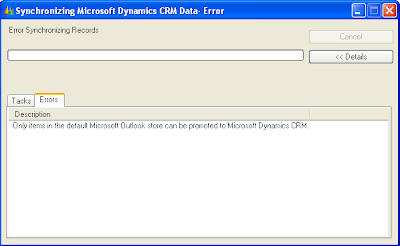
My advice for now is to forget about Google Apps/Gmail IMAP and MS CRM Dynamics 4.0 Outlook Client integration.
2008-03-31
POP3 and MS CRM 4.0 Queues
Michael Lu made this excellent video about using MS CRM Dynamics 4.0 E-mail Router with POP3 account. He used a Gmail account as an example. I recommend you to watch the video.
I myself conducted a similar test and I will write about it soon. I used a regular Gmail account as the user's mailbox.
I myself conducted a similar test and I will write about it soon. I used a regular Gmail account as the user's mailbox.
Subscribe to:
Posts (Atom)